Tutorial: researching a person lawfully
Looking up a named person is processing their personal data. Viokit will not do it until you say why. This tutorial walks through recording your purpose, researching, and then handling the person's rights: restriction, subject access and erasure.
This is a summary for the UK as of November 2026. It is not legal advice. You are the controller of the data you collect.
1. Start a person case
On Start here, choose Research a person. Type a name. The card says you will be asked for a purpose first. Press Start.
Use a public figure or an invented name while you learn.
2. Record your purpose
A panel called Before you look up people opens. It asks:
- Purpose. Due diligence, journalism, a legal claim, fraud or financial crime investigation, safeguarding, regulatory work, academic research, or other in your own words.
- Lawful basis. The reason the law allows it, such as legitimate interests, legal obligation or public task.
- Retention. How long you will keep the data before reviewing it: six months, a year, two years, until a date, or indefinitely with a written reason.
- Special purposes, optional. Journalism, academic, artistic or literary work, with a view to publication that you reasonably believe is in the public interest. This is not a general licence.
- Reference, optional. A matter or ticket number.
Fill it in honestly and record it.
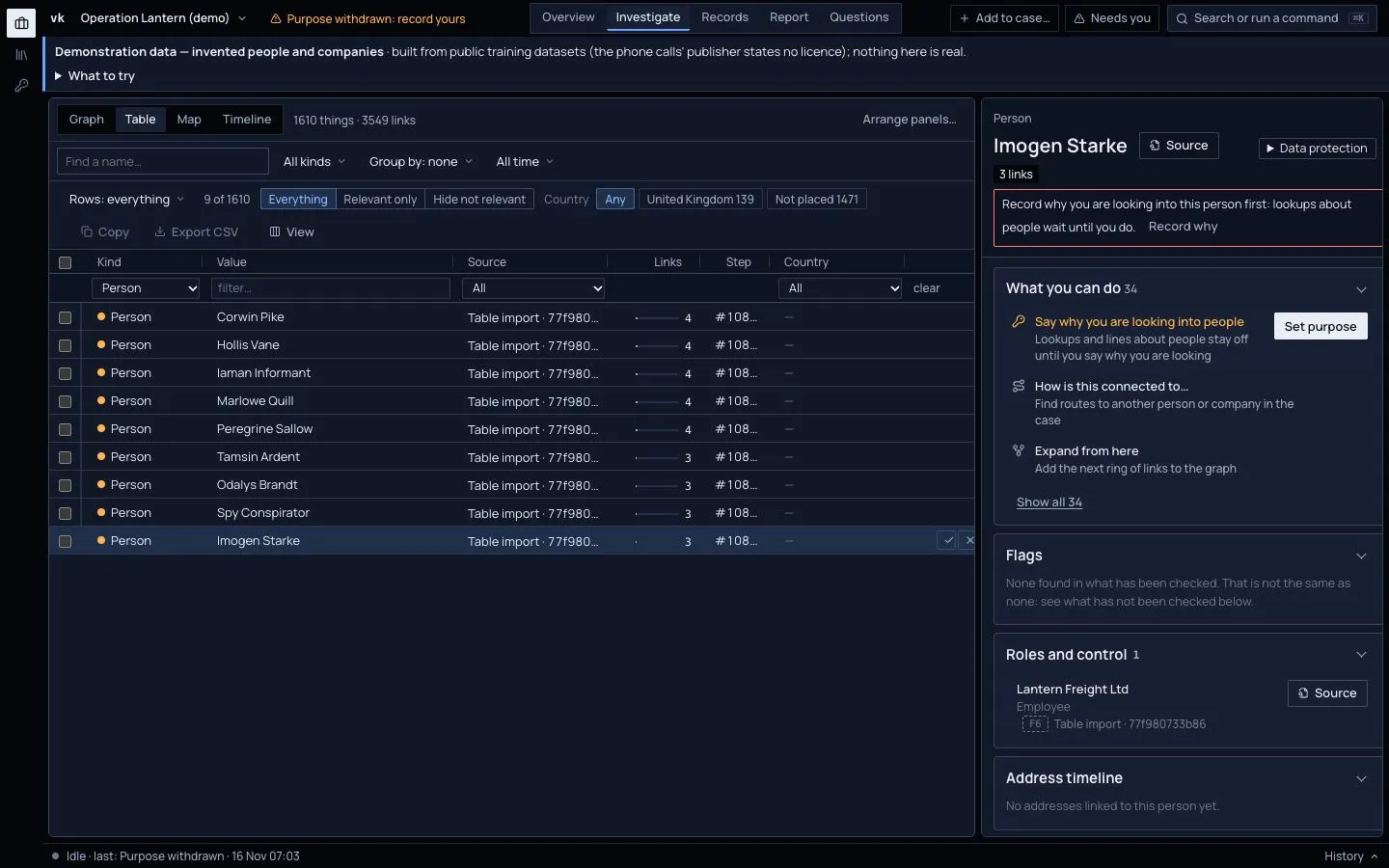
The case bar now shows the purpose, such as "Purpose: Due diligence, legitimate interests". Before you did this it said No purpose recorded, and a person's dossier asked you to Record why first.
Company, website and vehicle lookups never need a purpose. Only lookups of a person do.
3. Read the person's dossier
Pick the person. The right-hand column becomes their dossier. It shows only what the case holds:
- Header. Name, month and year of birth (never the day), nationality and countries.
- Roles and control. Directorships and other roles, with dates, source and grade.
- Addresses over time. Each address with where it came from. For UK directors, home addresses are not public. You see a service address.
- Associates. Co-directors and people at the same address.
- Flags. Possible sanctions matches, leaked offshore records, disqualifications, insolvency and court records, donations and declared interests.
- Not yet checked. What could not run, and why, and where to look by hand.
A sanctions flag is a name match. Check it before you believe it. Many people share a name. The same goes for a match on a wanted list (FBI, NCA): it says an agency lists someone with that name, not that it is your person, and not that anyone is guilty.
4. Accept the limits of a name
Two records with the same name are not the same person unless something else agrees: a month and year of birth, a shared address or the same Wikidata entry. Viokit proposes a match only then. A name and nothing else is listed as "possibly the same person" and is never merged. Review each in Matches to review.
5. When the review date comes
The case bar warns you 30 days before the review date, and again when it passes. Record the purpose again to renew it, or delete or reduce the data. See Delete a case.
6. Restrict processing
If a person asks you to pause, or accuracy is disputed, pick them and, in the header of their dossier on the right, open Data protection and press Restrict processing….
Their facts stay and are shown. But no new lookups run on them, and phone and bank analysis leaves them out. The report's handling note says who is restricted and since when. Press Lift the restriction… when it ends.
7. Give them what you hold
For a subject access request, press Export everything held. You get a readable summary to send and the data as a file. It lists what the case holds about the person, every source behind each statement, and how each file was obtained. The export is itself logged.
8. Erase a person
Press Erase this person…. Only the case owner may.
- Viokit shows a dry run. It lists exactly what would go.
- Choose the basis, such as an erasure request or the purpose having ended.
- Write the reason.
- Press Erase from this case.
The record keeps only that an erasure happened, when, by whom and why. It never keeps who was erased. After erasure the person is withheld from every view, report and export. A later lookup that finds them again stays withheld.
Erasure does not reach other cases, copies you exported earlier, or free text that names the person inside another record. Read the dry run. Imported files stay in the case as exhibits but are blacked out in exports.
What you have learned
- You record a purpose and a review date before looking up a person.
- Names alone never merge.
- Restriction, subject access and erasure are in the Data protection menu of the person's dossier, each recorded.
See also Limits and honest caveats and People investigations.