For law-enforcement analysts
Phones, calls, cells and open sources in one case. Every exhibit has its custody log.
Seized phones, call records and cell sites usually live in one tool and open sources in another. Viokit puts them in one case, keeps an exhibit reference and custody record for every file, and writes the report with its evidence attached.
The questions you start with
- What do these extractions and call records show, and when?
- Did the SIM or the handset change?
- Where were these phones, and were two of them together?
- Will the custody and the report stand up when they are challenged?
A worked example
Phone records show the swap
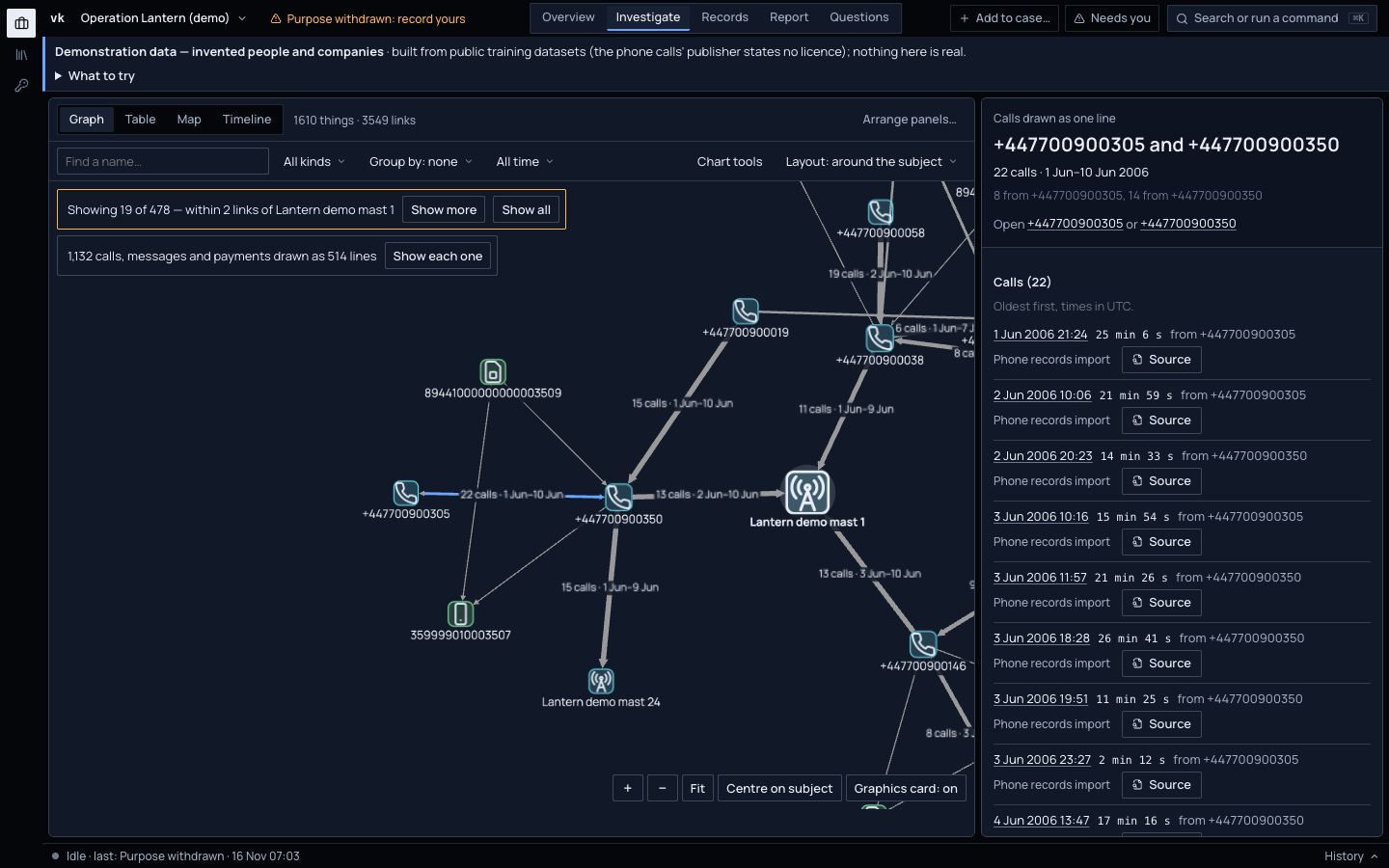
An analyst imports call records, a phone extraction and a cell site list, each with its exhibit reference. Viokit finds:
- highly likelyOn 5 June one number moved to a new handset and then to a new SIM within hours (80 to 90%). An upgrade, a lost phone and a SIM swap look alike, and the finding says so.
- 1,132 calls, messages and payments drawn as 514 lines. One line reads “22 calls · 1 Jun–10 Jun”; click it for each call and its source.
- The map plays the ten days, with cell sites drawn as the areas they cover, never as pins.
- The report carries the findings, their limits and the exhibits behind them.
What matters for your work
Each is built today and links to the guide page that shows it, unless it is marked in progress or planned.
Phone extractions and call records
Cellebrite UFDR, XRY, Android and unencrypted iOS extractions, call records, cell site lists, location history, WhatsApp, Telegram, email, USB, Bluetooth and Wi-Fi traces, statements and any spreadsheet.
Evidence in the guide: Import recordsFindings from the records
SIM and handset changes, numbers used together, who calls whom (an association chart, busiest first), call patterns by hour and day, and theme lines per number.
Evidence in the guide: Find SIM swaps and call patternsCell sites and the map over time
Cell sectors drawn as areas, device-reported positions, a time strip you can play, and where two numbers were possibly together.
Evidence in the guide: See places on the map, over timeExhibits and custody
Every import is fingerprinted and given an exhibit reference. Any file or physical item can be an exhibit too, with your label reference, who produced it, who it was obtained from and the authority. Its custody log (received, examined, copied, transferred, returned) only grows.
Evidence in the guide: Add an exhibit and analyse itReading inside the exhibit
Read an exhibit's metadata, the text in an image, the speech in a recording and frames from a video, plus MD5 and SHA-1 for known-file lists. Each result is an exhibit of its own and each run is an Examined entry in the custody log. Metadata is shown as the file's claim, never as a fact.
Evidence in the guide: Analyse the fileThe lawful-basis gate
Lookups and imports about people wait until the case records a purpose and lawful basis. Retention review, restriction, erasure and subject access are built in.
Evidence in the guide: People investigationsGrading you already use
Source and information graded on every fact, shown in the 3×5×2 form UK policing uses if you prefer, and likelihood on the UK probability yardstick.
Evidence in the guide: Assessment languageReports built to be challenged
Methodology, findings with their limits, sources with grades and an evidence appendix, as Word, PDF, HTML or Markdown. A signed case bundle lets the receiver check nothing changed. A disclosure schedule and court bundle are planned.
Evidence in the guide: Build a reportWanted lists
Screen a name against the FBI's and the National Crime Agency's published wanted lists. A hit is a candidate with its reason.
Evidence in the guide: Sources and grades
Coming from i2 or Maltego?
If you have built link charts in i2 Analyst's Notebook or run lookups in Maltego, much of Viokit will make sense on day one. This is what carries over, and what works differently.
What will feel familiar
- A link chart of things and links, with layouts, grouping, conditional formatting and export as a picture.
- A timeline with a lane per person, phone or account, and a tie between lanes for each call or payment.
- Right-click a thing on the chart to run a lookup on it and draw what comes back.
- Export to Maltego as GraphML with a table of every link, and to FollowTheMoney for Aleph.
How Viokit differs
- It runs where you are
- Cases and evidence stay on your computer, or a server your organisation runs. With a data pack installed, a lookup against that list never leaves the machine.
- Evidence on every link
- Every link carries the record it came from, kept as it arrived and fingerprinted. Click any link or fact to open its source.
- Every fact graded
- Each fact is graded for how reliable its source is and how well it is borne out: A1 to F6, or the 3×5×2 form UK policing uses. Each judgement carries a likelihood with its range.
- Records analysis built in
- Phone extractions, call records, chats and bank statements go into the same case as the public records, with findings such as SIM swaps and structuring already worked out.
- Agents work under the same rules
- An AI agent you connect can do what you can do in the console, under the same evidence rules and lawful-basis gates. Its proposals wait for a person.
Not there yet: import from either tool, and export to i2. Viokit does not replace a forensic extraction tool: it reads the reports they produce.
i2 and Analyst's Notebook, and Maltego, are trademarks of their owners. Viokit is not affiliated with or endorsed by either.
What is not there yet
We would rather you hear it here than find it on a live case. The direction page says what comes next.
Where Viokit is going- Viokit reads the reports extraction tools produce. It does not extract a device, and it never unlocks or decrypts one.
- A disclosure schedule and a court bundle are planned.
- Times in phone records are shown in UTC unless the file says otherwise.
- Viokit works to the ACPO/NPCC principles and ISO/IEC 27037, but is not certified against them.