How to install a tool pack
A tool pack is a lookup or analysis tool someone else built (a newsroom, an NGO, a researcher) that you add to Viokit. Once installed, its tools run like the built-in ones: from a lookup, or by themselves when Viokit expands a case.
Open Settings in the rail, then Tool packs.
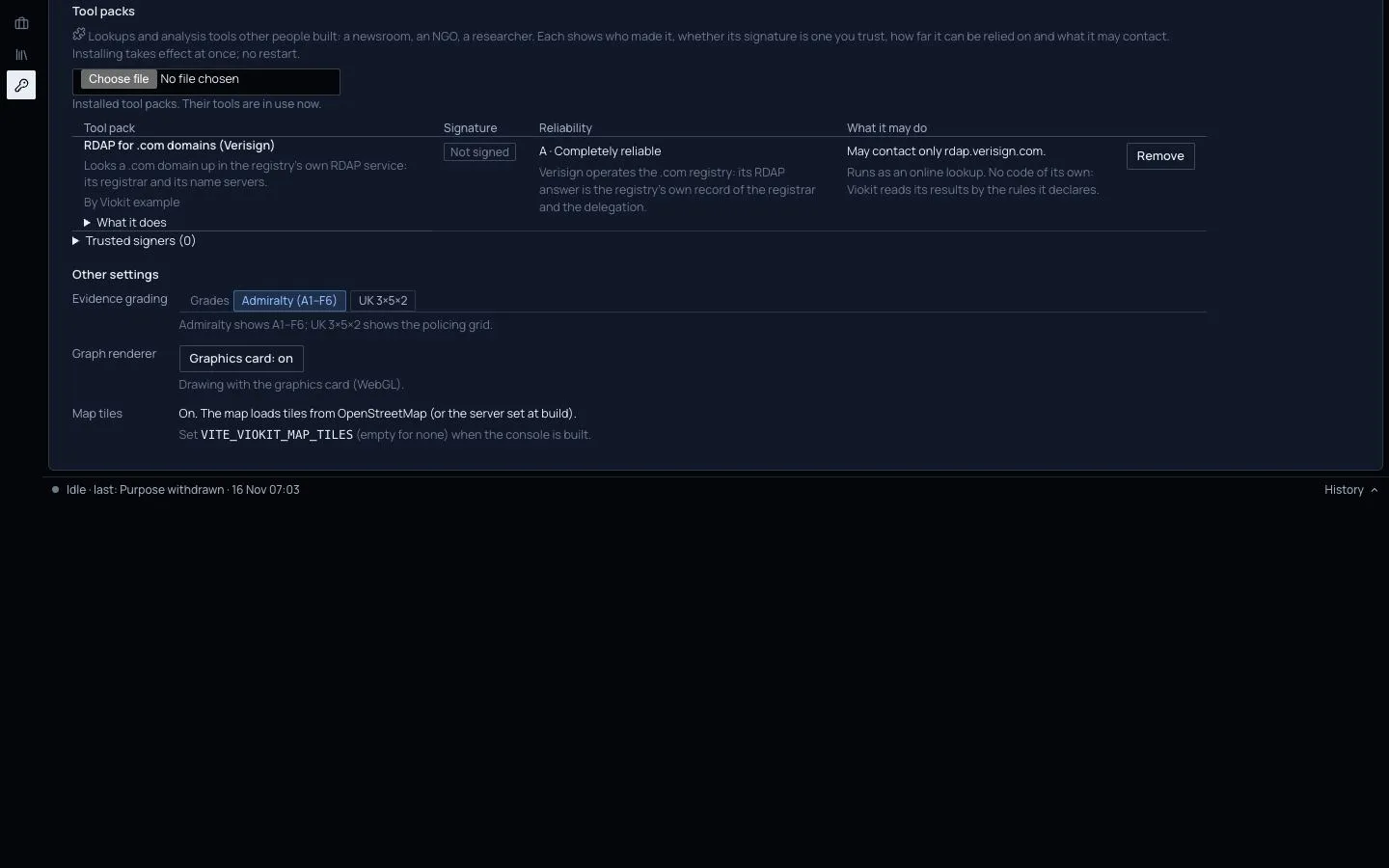
Install one
- Get the pack's file (it ends in
.vtp) from its author, or find it in the list under the installed packs if your organisation has set up a tool-pack index. - Press Choose file under Tool packs and pick the file, or press Install beside a listed pack.
- Viokit checks it before anything is installed. It is in use at once; nothing needs restarting.
If Viokit refuses a pack it says why: the file was changed after it was signed, it uses a kind of thing Viokit does not know, it would contact a site it did not declare, or it brings its own code and nobody you trust signed it.
Read what you installed
Each installed pack shows:
- Who made it, and its licence.
- Signature: "Signed by" someone you trust, signed by a key you have not trusted, or not signed at all.
- Reliability: its grade, A to F, and why, as the author gave it. Treat it as you would any source's.
- What it may do: the only sites it may contact (Viokit blocks any other), and whether it brings its own code. Code from a pack runs walled off, with no access to your files or the network.
Under What it does are its tools, its version, and who installed it and when.
Trust a signer
A pack that brings its own code installs only when someone you trust signed it. Open Trusted signers, type who the key belongs to and paste their public key, then press Trust this signer. Only add a key you got from them directly. Stop trusting removes it, and any pack with code they signed stops working at once.
Remove one
Press Remove. Its tools stop at once. What they already found stays in your cases, with its evidence.
Limits
- A pack can still be wrong. Its grade is the author's, and its findings carry it.
- Tools that run programs need Viokit's tools to be running. Without them they are listed but do not run.
- To build a pack yourself, see the tool-pack SDK.