Built today Tool packs
Build a tool once.Every analyst can run it.
A tool pack is a lookup or analysis tool packaged for Viokit. It states what it takes, what it finds, how far it can be relied on and the only sites it may contact. Anyone can build one, sign it and hand it out. An analyst installs it from Settings › Tool packs, sees exactly what it may do, and its tools run like the built-in ones.
What every pack is held to
Viokit keeps these, not the pack. A pack that breaks one is refused or stopped.
Signed, and you choose whom to trust
Every pack shows its author and licence. A signed pack shows who signed it, and you decide whose signature you trust. Stop trusting a signer and their packs with code stop at once.
It reaches only the sites it declares
A pack lists every site its tools may contact. Viokit blocks any other, and shows you the list.
Community code runs sealed off
Code from a pack installs only when someone you trust signed it. It runs sealed off, with no access to your files or the network: it can only read the answer and say what it found.
Checked every time
A pack says what kinds of thing it finds; anything else it reports is refused, whole. A file changed after it was signed is refused at install and every time it loads.
Removed in one press
Remove a pack and its tools stop at once. What they already found stays in your cases, with its evidence and its grade.
Who might build one
Newsrooms
A register or court list your desk checks by hand every week, turned into a lookup every reporter can run, with its grade and its terms stated.
NGOs and human-rights groups
A monitoring dataset or a method your team trusts, shared with partner organisations so every investigation reads it the same way.
Police technical units
An in-house tool, signed by your unit and trusted only on your analysts' machines. Nothing about it is published.
Researchers
A source or technique from your research, packaged so others can run it, cite it and see how far it can be relied on.
How a pack is made
The kit that checks, tests, signs and builds a pack runs on your own computer. It is in early access.
Describe it
What the tool takes (a domain, a phone number, a file), what it finds, which sites it may contact, its licence and its grade with the reason.
Test it
Add real answers from the source, kept unedited. The kit checks the pack reads each one into exactly the links you expect.
Sign it
Sign it with your own key and build it into one file. Publish the public half of your key so analysts can choose to trust it.
Share it
Send the file to the people who need it, or list it in a signed index your organisation runs, so it appears in their Settings.
What a pack must do
- Say where the data comes from and on what terms.
- Grade it honestly, A to F, with the reason in one line.
- Test it against real answers, captured unedited.
- Say so if the tool contacts the target itself, rather than a registry.
- Never wrap breached or stolen data.
A worked example: who a .com domain is registered through
Give it a .com domain and it asks the registry's own record service, run by Verisign. The registrar and the name servers it finds join the case as links, each pointing back to the answer as it came back. It is graded A, because the answer is the registry's own record, and it may contact that one site and no other. It brings no code of its own, so it installs without a signature.
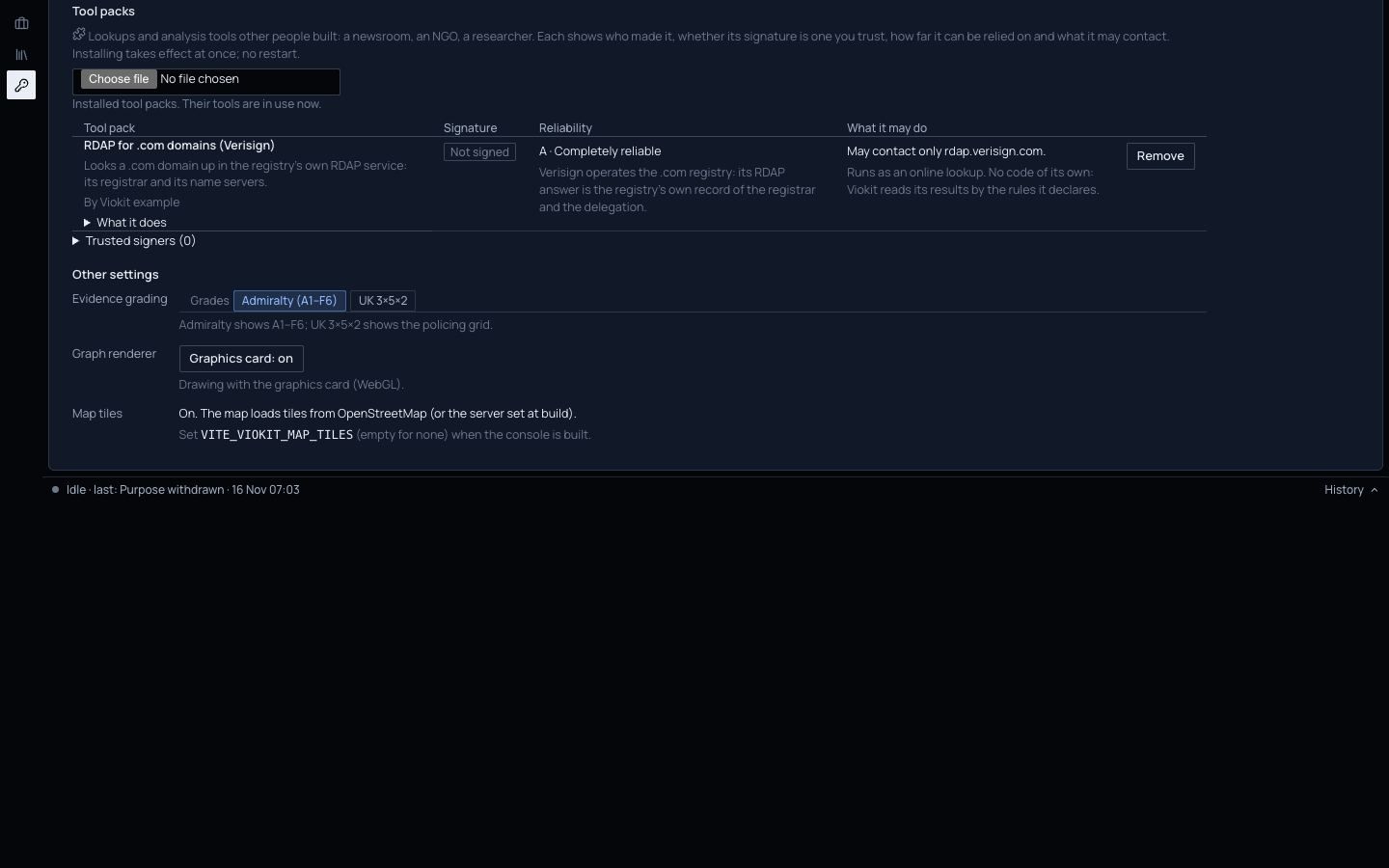
Settings › Tool packs on the demo case. Click the picture to see it full size.
Not there yet
- A pack can still be wrong. Its grade is the author's, and every finding carries it, as with any source.
- Packs that need an account or a key are not supported yet.
- There is no public index of community packs yet. An organisation can run a signed index of its own.
- Tools that run a program on your machine, rather than ask a website, need Viokit's network and file tools set up. Without them they are listed but do not run.