What's new
What's new in Viokit
What shipped, newest first, in plain words. Each note links to the guide page that explains it.
Verify a photo, video or web page, check by check
Before you rely on a photo, a video or a post, work through the checks of the Berkeley Protocol, in its phases: preservation, verification and analysis. Pick an exhibit and Verify sits below its custody log: source and uploader, first appearance, metadata, place, time, corroboration and your overall assessment. Viokit runs the look-ups and works out the figures; it never decides whether an item is genuine. Each conclusion is yours: consistent with the claim, contradicting it or inconclusive, how likely you think it is, and what you compared. A check is never changed; to revise one, record another.
Evidence in the guide: Verify a photo, video or web page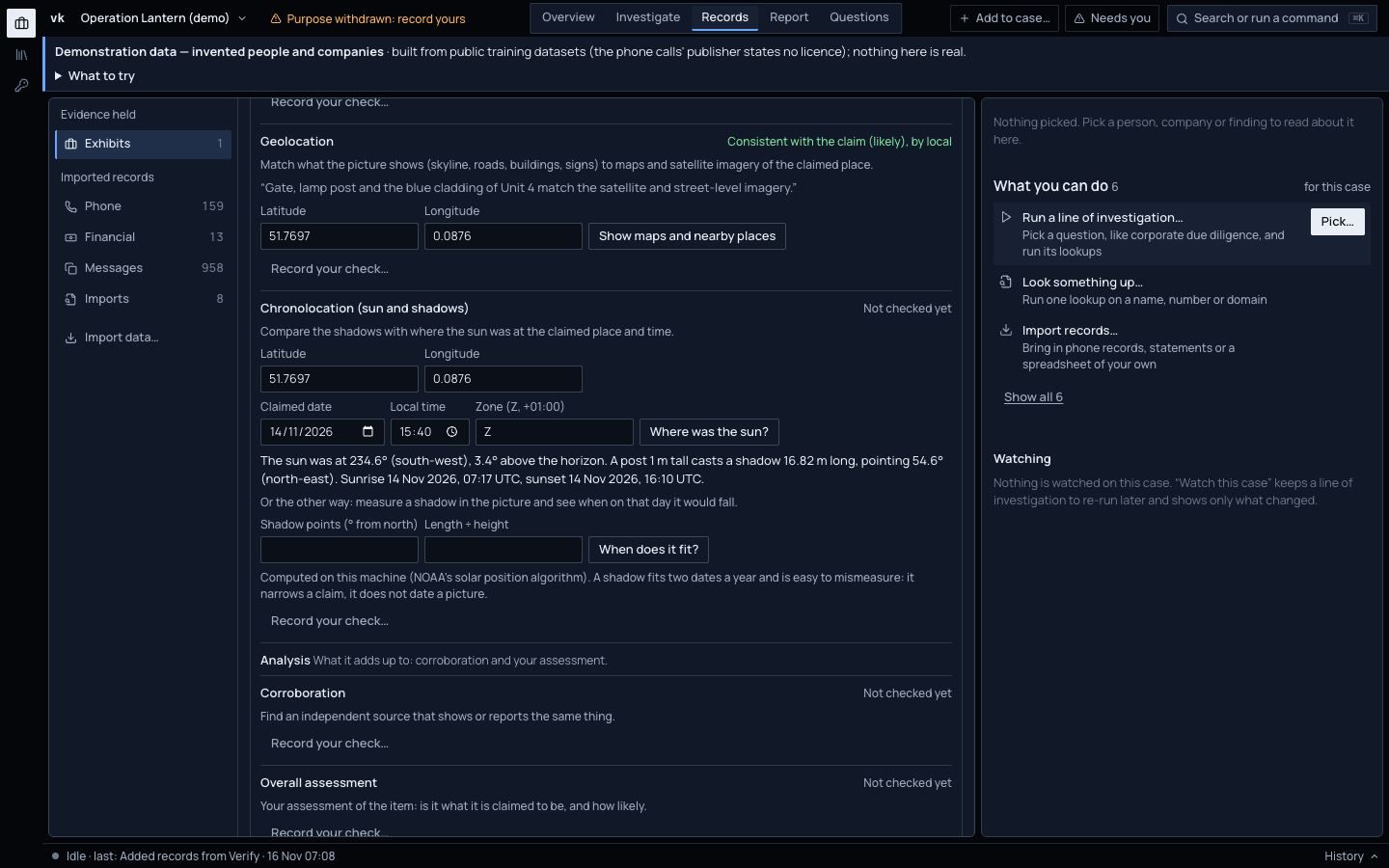
Capture a web page or post as an exhibit
A page can change or vanish, so capture it first. Give its address and Viokit keeps it as an exhibit: every request and reply through each redirect, the page as the server sent it, a full-page screenshot and the page as the browser drew it, each with its fingerprint. The custody log starts with who captured it, when, and how the request reached the internet. Capturing visits the page from your computer, so the site's owner can see the visit; Viokit says so before you press the button.
Evidence in the guide: Capture a web page or postA copy in the Wayback Machine, and the earliest one it holds
Save a copy of a page to the Wayback Machine, so an archive independent of you keeps it too; no key is needed. Ask for the earliest copy the Archive holds of an address, or of a photo's exact bytes. That date says the item existed no later than then; it is not when it was made.
Evidence in the guide: Preservation and first appearanceWhere the sun was, the shadows it cast, and the place on a map
Give the claimed place, date and time, and Viokit works out where the sun was and the shadow a 1 m post would cast, on your computer, by a published astronomy method. Measure a shadow in the picture and it lists the times that day it would fall like that. For a place you get map, satellite, aerial and street-level links and the nearest named road, neighbourhood and town. Reverse-image search comes as links to Google Lens, Yandex, Bing and TinEye that you open yourself.
Evidence in the guide: Place and timeTool packs: add tools other people built
A tool pack is a lookup or analysis tool someone else built, a newsroom, an NGO, a police technical unit or a researcher, that you add to Viokit from Settings › Tool packs. Its tools then run like the built-in ones. Each pack shows who made it, whether someone you trust signed it, its grade A to F with the reason, and the only sites it may contact; Viokit blocks any other. A pack that brings code of its own installs only when someone you trust signed it, and that code runs sealed off from your files and the network. Remove a pack and its tools stop at once; what they found stays in your cases, with its evidence.
Evidence in the guide: Install a tool pack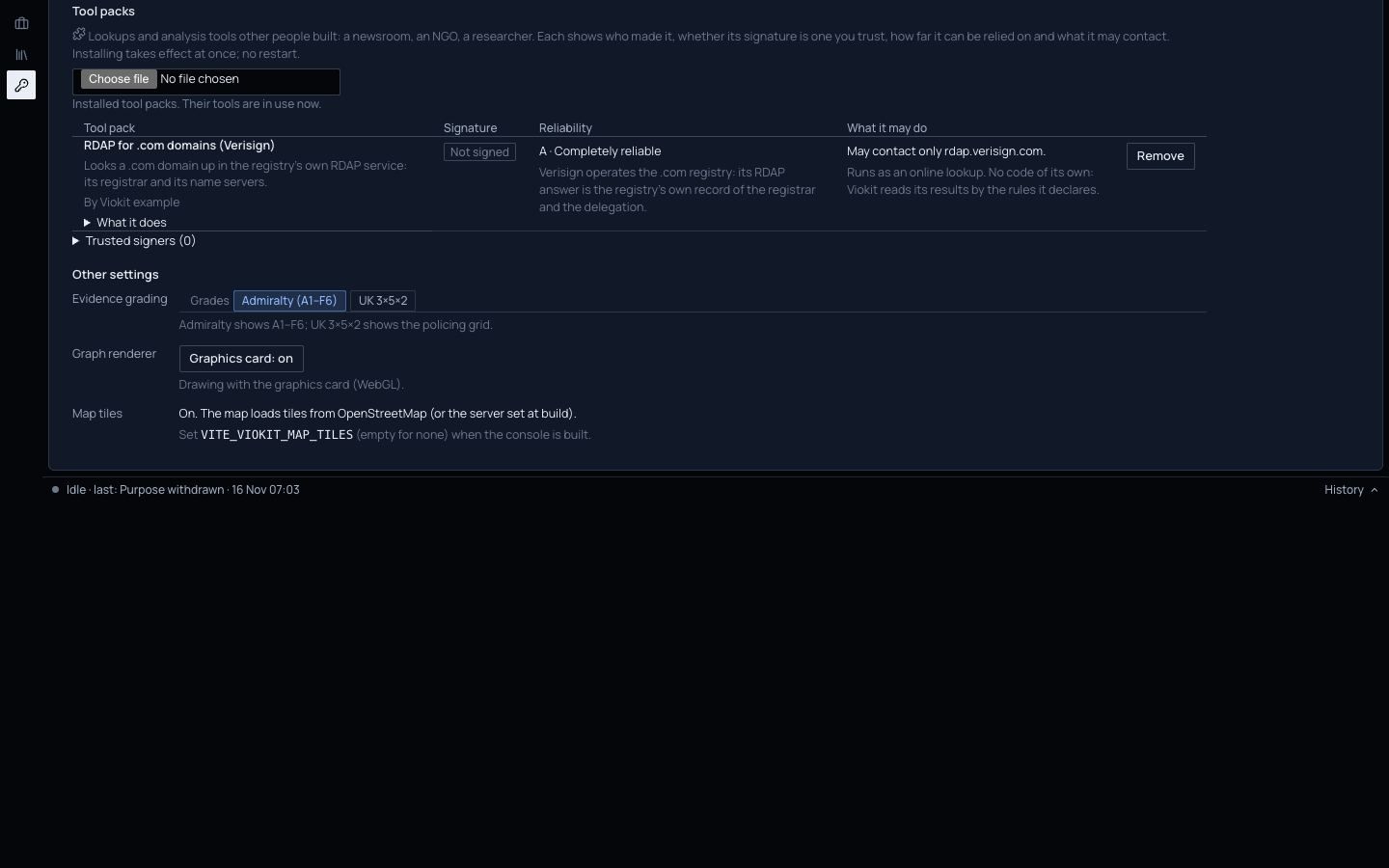
An example pack: who a .com domain is registered through
The first pack is a worked example: give it a .com domain and it asks the registry's own record service, run by Verisign, then adds the registrar and the name servers to the case. It is graded A, because the answer is the registry's own record, and it may contact that one site and no other.
Evidence in the guide: The example packCalls and payments drawn as weighted links
A phone case used to fill the chart with one box per call. Now, in a case with ten or more calls, messages and payments, the chart draws one line between each pair of phones or accounts, thicker for more. A line reads “22 calls · 1 Jun–10 Jun” or “3 payments · £29,825”. Click it to list every call or payment behind it, each with its source.
Evidence in the guide: Calls and payments as links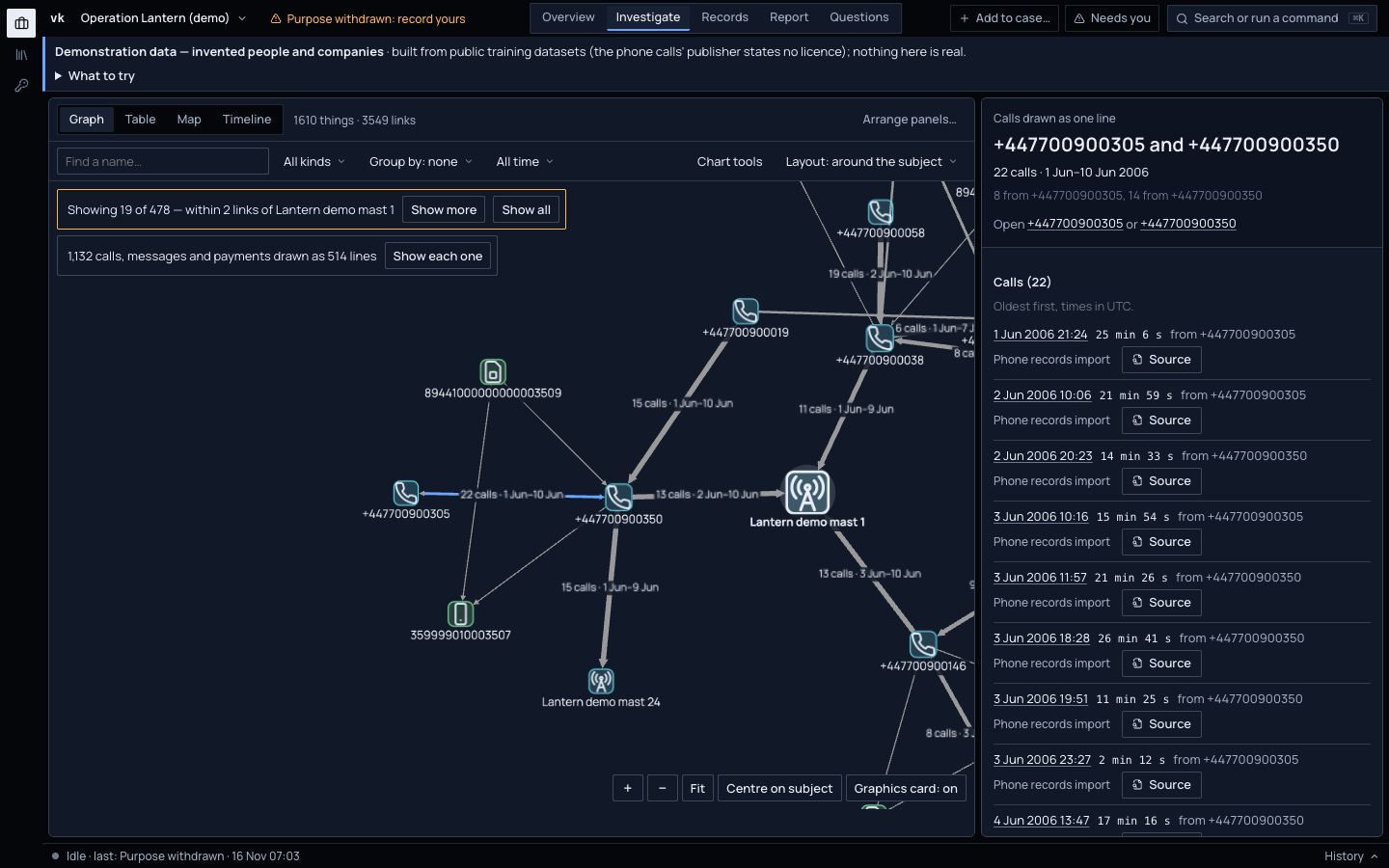
A lane timeline for any person, phone or account
Investigate › Timeline now shows lanes: one line per person, phone or account, a mark for each call, message or payment, and a tie between two lanes when one called or paid the other, with the amount. Pick someone to see them and the seven they dealt with most. Drag across the lanes to zoom in on a few days; the map and the chart follow.
Evidence in the guide: See payments over time, by person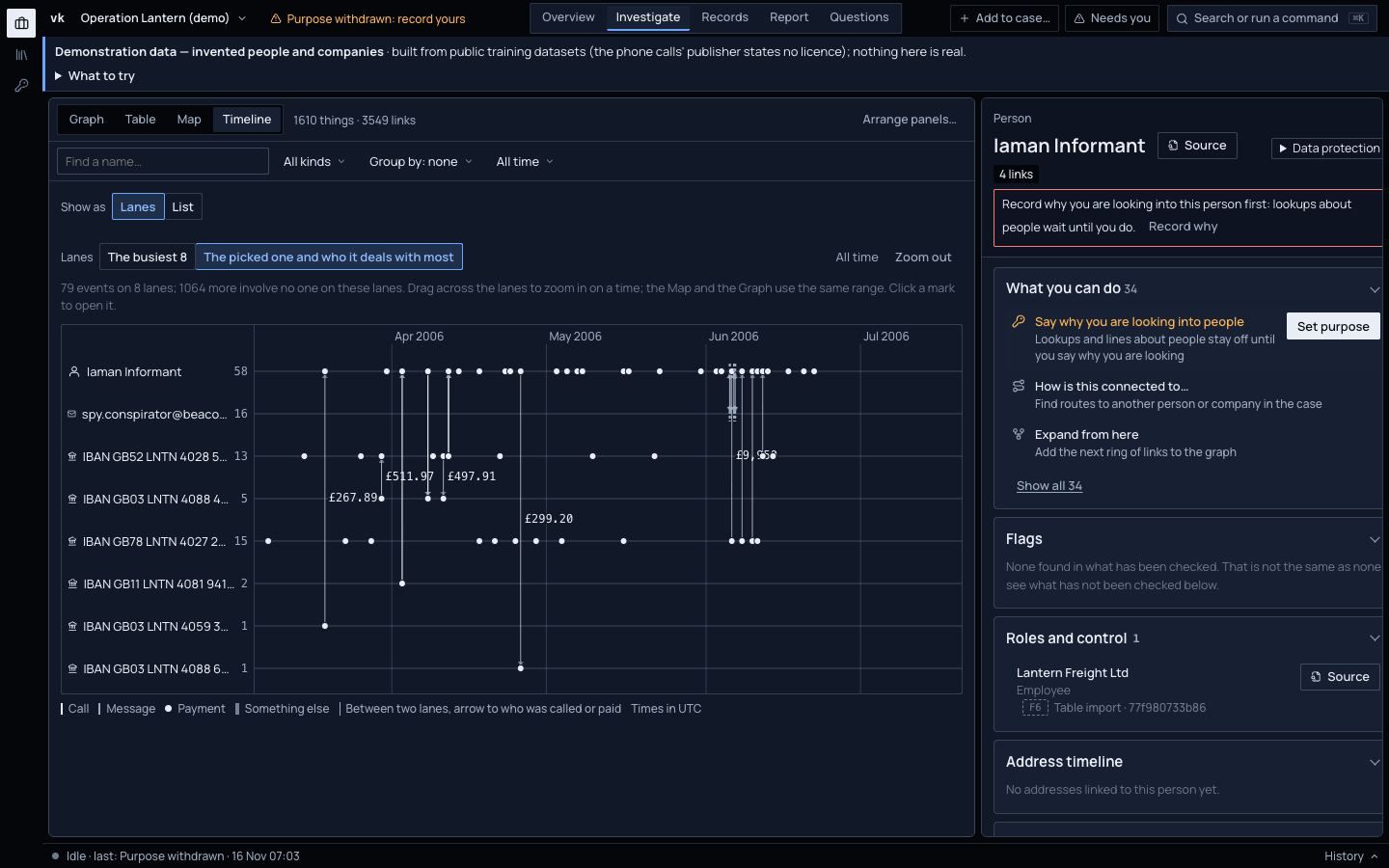
Read what is inside an exhibit: metadata, text, speech and frames
Records › Exhibits now has tools that read inside a file, on your machine, with nothing sent anywhere: a photo's camera and position metadata, the text in an image or a scan, a transcript of a voice memo or a video's sound with the time of each line, a still every few seconds of a video, and MD5 and SHA-1 fingerprints for known-file lists. Each result is kept as an exhibit of its own pointing back to the original, and each run is an Examined entry in the custody log. Readings say what they are: a place or time from metadata is “the file's metadata says…”, probable at best, because metadata can be edited; a transcript is a machine reading to check against the recording.
Evidence in the guide: Analyse the file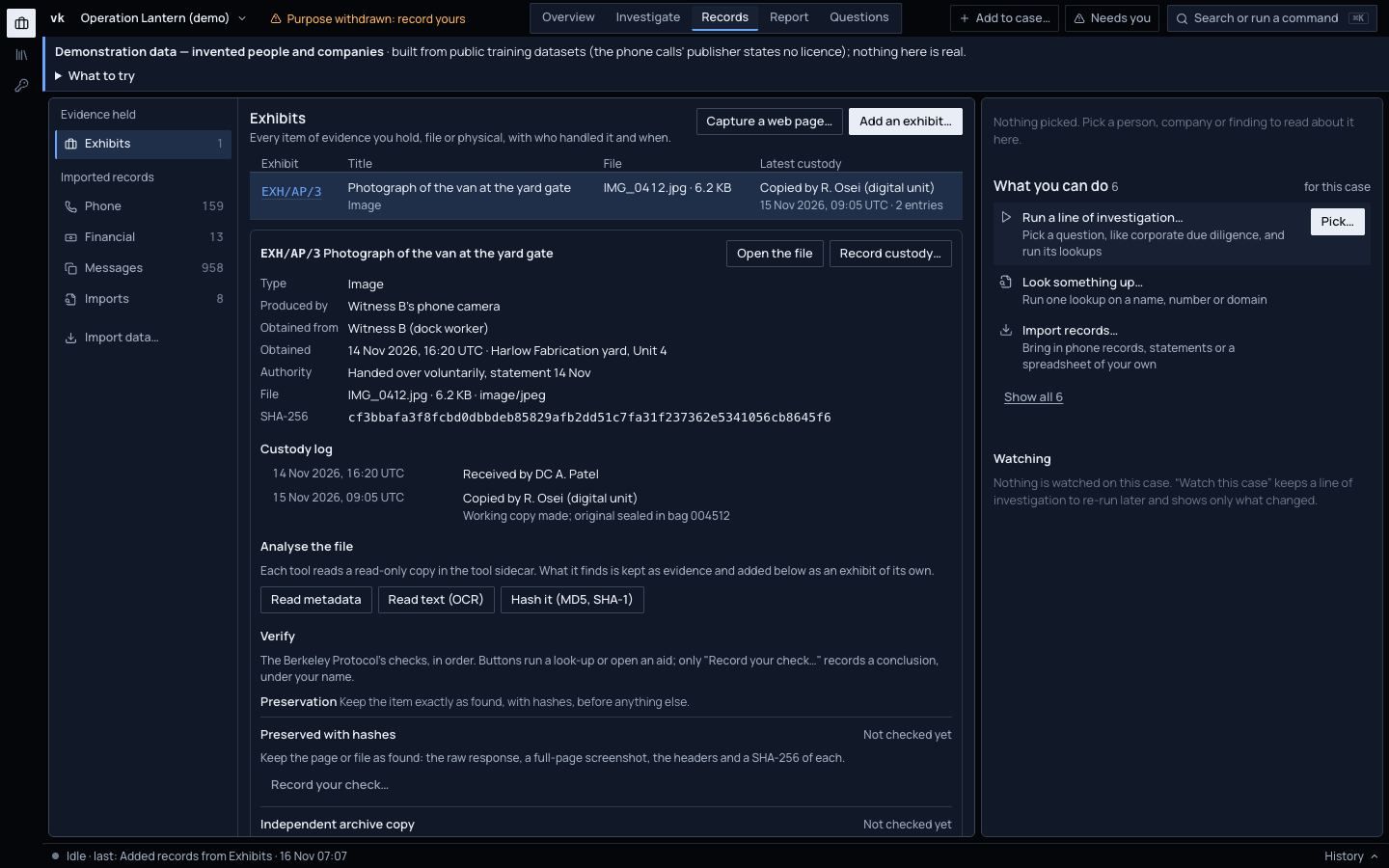
Exhibits with a custody log
Any item of evidence can now be an exhibit: a file kept byte for byte, or a physical item described and photographed. Each has your label reference, who produced it, who it was obtained from, where, when and under what authority, and a custody log (received, examined, copied, transferred, returned) that only ever grows. A correction is a new entry, never an edit.
Evidence in the guide: Add an exhibit and analyse itAdd to case, from anywhere
Put something you already know on the case at any time: a name, a number, a domain, an address. Press Add to case… at the top right, or type it into the command search and pick Add to the case.
Evidence in the guide: Add something you already knowReports start from your subject and question
The first time you write a report, Viokit asks what it is about and the question it answers, so a report is never titled after a record it guessed at.
Evidence in the guide: Build a reportA new website and a public user guide
This site, with the whole user guide, a coverage map, a page on how Viokit handles your case and a page on where it is going.
Evidence in the guide: The user guide
A whole company group from one company, offline
Give Viokit one UK company number. With the free Companies House data packs installed it finds the parent, every company the parent controls, the directors behind them and the companies sharing their address, offline and without a key. On a real company group that took about ten seconds.
Evidence in the guide: Your first company caseRussia's company register
Look up a Russian company by its tax number (INN), its registration number (OGRN) or its name, in the register the Russian tax service publishes. No key needed.
Evidence in the guide: Sources and gradesTrace a crypto address
Paste a Bitcoin or Ethereum address. Viokit checks it, reads its balance and recent payments from a public block explorer, and adds each counterparty as a new lead. No key needed. It says plainly what it cannot tell you: who is behind an address.
Evidence in the guide: Trace a crypto addressWanted lists
Screen a name against the FBI's and the National Crime Agency's published wanted lists. A hit is a candidate with its reason, never a match, and the lookup runs only once the case records a purpose.
Evidence in the guide: Limits and honest caveatsExport-control screening and US nonprofits
The US Consolidated Screening List, which brings together the US export-control and other non-SDN lists, is now a free data pack, checked on your machine. US nonprofits can be looked up from their tax filings.
Evidence in the guide: Install data packsPhone, email and IBAN checks, offline
A phone number, an email address or an IBAN is checked on your own machine: whether it can be real, its country, its line type or bank, and whether an email uses a throwaway domain. Nothing is sent anywhere.
Evidence in the guide: Follow a phone, email or IBAN leadShell networks, sanctions evasion and phone leads
Three ready-made lines of investigation: is this company part of a network of shells; is this company or person, or anyone who owns or runs it, on a sanctions or PEP list or in the offshore leaks; and what does this phone number say, and which records hold it.
Evidence in the guide: Lines of investigationOne case history
One history of everything that happened in a case: each lookup, import, line of investigation, item you added and purpose recorded, with when, by whom and what it added. The status bar says what was done last, even before you opened Viokit.
Evidence in the guide: The screenChats and email
WhatsApp and Telegram chat exports and email files now import alongside phone extractions and call records, and Viokit shows who is in touch with whom across every channel.
Evidence in the guide: Import recordsCase bundles anyone can check
Export a whole case as one file a colleague can open and check: any changed, missing or extra part is caught and the file is refused. Signed where your organisation has a key, encrypted with a passphrase if you want.
Evidence in the guide: Case bundlesOne app to run
Viokit now runs as a single app on your own machine, with your cases kept in one folder. A few network tools still need an add-on.
Earlier work is described in the user guide. For what is being built now and what comes next: Where Viokit is going